
1.5MADE TO MEASURE
Ten66 asked why their long, thin map came in a square box with dark curtains drawn either side. We took the curtains down.
In plain terms: on a 1:2 or 1:3 map the minimap now takes the map's own shape -- no dark borders, and the map shown bigger -- and the window follows it.
- New: a map that isn't square fills the minimap — its short side at full size, its long side running on. No more dark borders, and a 1:2 or 1:3 map is shown up to two or three times as big
- New: the window follows the map's shape — on a narrow map the buttons wrap into extra rows, the layer icons get a little smaller and the title shortens to MM. S, M and L keep their sizes, and the window always stays on the screen
- Better: the window no longer hops when you pick a size or fold it — it only moves when it would run off the screen
- A square map looks just as before
- Thanks: to Ten66 for the idea
 Neu in 1.5: Auf einer 1:2- oder 1:3-Karte nimmt die Minikarte jetzt die Form der Karte an – keine dunklen Ränder, die Karte größer – und das Fenster passt sich an.
- Neu: eine nicht quadratische Karte füllt die Minikarte – die kurze Seite in voller Größe, die lange läuft weiter. Keine dunklen Ränder mehr, und eine 1:2- oder 1:3-Karte wird bis zu zwei- oder dreimal so groß gezeigt
- Neu: das Fenster folgt der Form der Karte – auf einer schmalen Karte rutschen die Knöpfe in zusätzliche Reihen, die Ebenen-Symbole werden etwas kleiner und der Titel wird zu MM. S, M und L behalten ihre Größen, und das Fenster bleibt immer auf dem Bildschirm
- Besser: das Fenster springt nicht mehr, wenn du eine Größe wählst oder es einklappst – es bewegt sich nur, wenn es sonst aus dem Bildschirm laufen würde
- Eine quadratische Karte sieht aus wie bisher
- Danke: an Ten66 für die Idee
📜 Every update so far, in English and German: tfbpx.com/pyt-minimap-history.html
1.4.2QUIET PLEASE
Our NEW button bounced like a puppy at the door, shoving every button beside it. It has been rehomed. And clicking the PYT row could pull the rug out from under the game — the rug is now nailed down.
In plain terms: clicking the PYT row no longer crashes the game, the NEWS button is gone, and PYT — Settings no longer stutters on big maps.
- Fixed: clicking the PYT icon or a tile in its row could crash the game — the button was taken away while the game was still handling the click (seen together with the Mod Bar mod)
- Gone: the NEWS button in the PYT row. It bounced and pushed other buttons around, and you told us you didn't want it — we listen
- Tidier: the PYT row shows one settings cog (some setups showed two), and the 'fade until the mouse is over it' setting is always in PYT — Settings
- Smoother: with PYT — Settings open on a big map, its performance meter no longer stalls the game every 10 seconds (it could make the sound flutter) — it reads once when you open it, then every 2 minutes
- Thanks: to QuickNiq for the crash log and honest feedback, and to the Mod Bar players who spoke up
Neu in 1.4.2: Ein Klick in die PYT-Leiste lässt das Spiel nicht mehr abstürzen, der NEWS-Knopf ist weg, und PYT — Settings ruckelt auf großen Karten nicht mehr.
1.4.1NO MORE HICCUPS
Every ten seconds, the PYT family stopped everything to check a stopwatch nobody was looking at. MrHamstring spent a whole evening tracking it down — thank you.
In plain terms: less work in the background on big maps — one cause of a short freeze every few seconds is fixed.
- Fixed: every 10 seconds the PYT engine read other PYT mods' saved data for its performance meter, even with the meter closed — on a big save that is slow work. It now reads only while the meter in PYT — Settings is open
- Smoother: the map still reads itself again about once a minute, but now only redraws when something on it changed. The Refresh button still updates everything at once
- Tip: think of the map like a web browser — 20 pages open and any computer slows down. Every layer you switch on is more for the map to plot, so show what you're focused on right now and switch the rest off. Big maps will thank you
- Thanks: to MrHamstring, who switched mods off one by one to find it — reports like this improve the mods for everyone, so keep them coming
Neu in 1.4.1: Eine Ursache für kurzes Einfrieren alle paar Sekunden ist behoben — die PYT-Engine liest die Daten anderer PYT-Mods nur noch bei offenem Leistungsmesser, und die Karte zeichnet sich nur neu, wenn sich etwas geändert hat. Danke an MrHamstring!
1.4SMOOTH OPERATOR
The map used to redraw the whole country every time a bus moved. It has learned to look up from the paper only for the bits that changed.
In plain terms: the map draws in small slices and reuses what didn't change, so big maps stay smooth — and it shares one time budget with the rest of the PYT family.
- Smoother on big maps: the map is built a slice per frame, and when only the vehicle dots or the plan move, the map underneath is kept, not redrawn
- One budget for the family: the map's drawing counts in PYT — Settings' performance meter and follows its 'Time per frame' (Light / Balanced / Full) and 'How often jobs run'
- PYT — Settings: the PYT button can fade until your mouse is over it, and a Language choice for the PYT windows
1.3.2CONSOLE FRIENDLY
Our windows politely asked the PlayStation for a close button. The PlayStation doesn't have one, took offence and walked out — taking your whole interface with it. We've had a word.
- In plain terms: on PS5, the PYT news and Settings windows no longer crash the interface (the map window was already fine). On PC nothing changes
- Thanks: to Maxmadimus, whose Pay Your Tolls report found it
1.3.1THE LONG AND THE SHORT OF IT
Busted: our developer only ever tested on square maps. Very square indeed. modiorange plays on a map five times longer than it is wide — and thanks to them, the square developer has been sent to stand in the corner.
In plain terms: on a rectangular map (1:2, 1:3, or longer), the Minimap now shows the map at its true shape instead of stretching it into a square.
- Fixed: rectangular maps were stretched into a square — the map now keeps its real shape, centred in the window, with the area beyond the map's edge shown dark
- Fixed: town borders stop at the map's edge
- Click the dark area and the camera flies to the nearest edge of the map. Square maps look exactly as before
- Thanks: to modiorange, who spotted it on a 1:5 map — reports like this improve the mods for everyone, so keep them coming
1.3JUST AS YOU LEFT IT
Ten66 set the map up just so, saved the game, loaded it again — and the map had forgotten everything. A goldfish has a better memory. Not any more.
In plain terms: every choice you make in the map is now saved with your game, and a new Vehicles switch shows where a line's vehicles are right now.
- Fixed: Population, and every other switch, came back off after saving and loading — now every choice is saved with your game: the layers, the open panel, Name / Population / Borders / Wanted goods, every filter, the zoom and the tolls' sizing
- New: Vehicles: On — in Lines, click a line under Your lines to show it on its own, then switch Vehicles on: its vehicles appear as white dots where they are right now, updated every few seconds
- Fixed: dragged right up to the top edge of the screen, the map's fold and size buttons stopped responding — the map now never sits higher than where they still work
- Thanks: to Ten66, who found the forgetful Population switch — reports like this improve the mods for everyone, so keep them coming
1.2.1TOP OF THE WORLD
Parked it in the top-right corner? It turns out 'top right' means top AND right. The map knows that now.
In plain terms: a map parked at the top of the screen stays at the top when it grows or shrinks -- it only moves sideways as far as it must.
- Fixed: parked at the top, growing or shrinking the map no longer dropped it down the screen — it keeps its height and only slides sideways
- Thanks: to everyone who parks their map in the corner — we do too
1.2THE MAP THAT COULD NOT MAP
Park it in the top-right corner, open a panel — and off it wandered, right over the edge of your screen. A map that couldn’t find its own way. We’ve had a word with it. Again.
- Stays on screen — parked on the right or at the bottom, a panel, the card or a bigger size now moves it back into view (one quick blink), and folding it puts it back where you parked it
- Never while you drag it — it only steps in after a click on one of its own buttons
- It sits right on top of the game’s bottom bar, and remembers spots in the bottom-right corner too
- Size S: town names show once you zoom in (x2 and up)
- In plain terms: the window no longer runs off the edge of the screen when it grows
★ Thank you, QuantumBlue1! You spotted it running off the edge and explained it perfectly — it took us a few tries, and here it is.
1.1A CLOSER LOOK
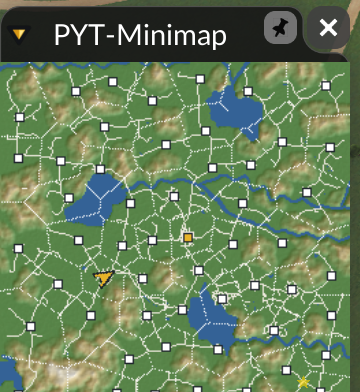
“It looks small, but it packs a punch — everything you could want and more.”
We gave the map a magnifying glass — and a memory. It now remembers where you left it, which is more than we can say for our car keys.
- Zoom in — the − and + or your mouse wheel, from x2 up to x12, right where you point; zoomed in, the map follows your camera
- Town info card — point at a town for its population, the goods it wants (supplied / wanted), how happy it is and its worst line; switch it off in Towns > Info card
- Wanted goods under each town’s name (Towns > Wanted goods): orange = short of it, blue = supplied
- The capital wears a crown; town names are shortened when zoomed out, so they stop piling up
- Pin it and ESC leaves it open; it reopens where you left it, and your save remembers its size, place, pin and whether it was open
- Fold it to just the map with the arrow in the title bar
- Click a PYT piece (a toll, a warehouse…) and the camera flies right down to it
- Pay Your Tolls 2.9’s map button opens the Minimap on your tolls
- Sketches start hidden — the Sketches icon shows them
- In plain terms: zoom, a town card, a remembered window and a cleaner look — plus 1.0.1’s log fix, finished
★ Thank you, QuantumBlue1! Pinning past ESC, the map reopening where you left it and the shorter town names were your ideas. Keep them coming — that’s how PYT gets better.
1.0.1A QUIETER MAP
Our map was keeping a diary of every frame it drew — in the game’s log, all of it. We’ve had a word.
- In plain terms: the Minimap no longer fills the game’s log with warnings while it’s open (worst on the S size or with the icons folded) — the log stays small and long sessions run smoother
- No other changes — zoom and more are coming in 1.1