
1.3.1QUIET PLEASE
Our NEW button bounced like a puppy at the door, shoving every button beside it. It has been rehomed. And clicking the PYT row could pull the rug out from under the game — the rug is now nailed down.
In plain terms: clicking the PYT row no longer crashes the game, the NEWS button is gone, and PYT — Settings no longer stutters on big maps.
- Fixed: on big saves the game could freeze for about a second every 10 seconds, even with no window open — the same fix as PYT - Minimap 1.4.1
- Fixed: clicking the PYT icon or a tile in its row could crash the game — the button was taken away while the game was still handling the click (seen together with the Mod Bar mod)
- Gone: the NEWS button in the PYT row. It bounced and pushed other buttons around, and you told us you didn't want it — we listen
- Tidier: the PYT row shows one settings cog (some setups showed two), and the 'fade until the mouse is over it' setting is always in PYT — Settings
- Smoother: with PYT — Settings open on a big map, its performance meter no longer stalls the game every 10 seconds (it could make the sound flutter) — it reads once when you open it, then every 2 minutes
- Thanks: to QuickNiq for the crash log and honest feedback, and to the Mod Bar players who spoke up
 Neu in 1.3.1: Ein Klick in die PYT-Leiste lässt das Spiel nicht mehr abstürzen, der NEWS-Knopf ist weg, und PYT — Settings ruckelt auf großen Karten nicht mehr.
📜 Every update so far, in English and German: tfbpx.com/pyt-distance-signs-history.html
1.3OPEN FOR BUSINESS
The Configure button on our signs was purely decorative — like a door painted on a wall. Players walked into it. It now opens, and there's a way back out.
In plain terms: Configure on a placed sign now works — change its style, its towns and its traffic side in place.
- Configure on a placed sign shows the five styles as tiles along the bottom — Auto, 1900, 1940, 1980, 2020. Pick one, click the sign: it swaps in place and keeps its towns
- Also in Configure: Towns (Auto / The 5 biggest / The 5 nearest) and Traffic drives on (Auto / Right / Left)
- Signs you placed before get the style tiles by themselves, free, the next time they read the road
- PYT — Settings: the PYT button can fade until your mouse is over it, and a Language choice for the PYT windows
- Thanks: to ajax_post, who found the dead Configure button
1.2.1CONSOLE FRIENDLY
Our windows politely asked the PlayStation for a close button. The PlayStation doesn't have one, took offence and walked out — taking your whole interface with it. We've had a word.
- In plain terms: on PS5, the PYT news and Settings windows no longer crash the interface. On PC nothing changes
- Thanks: to Maxmadimus, whose Pay Your Tolls report found it
1.2SIZE ISN'T EVERYTHING
Our signs only had eyes for the big cities; the village right down the road never got a mention. They have been sent on a sensitivity course.
In plain terms: a new setting chooses which five towns a sign lists — the biggest, or the nearest.
- New setting: Towns on a sign — The 5 biggest (as before: the largest towns down the road, a small one in between left out) or The 5 nearest (the first five towns down the road, whatever their size). Find it under the PYT button at the top of the screen > Settings > Signs; it applies to every sign in every save, within seconds
- Per sign too: a placed sign's own window has a Towns row — Auto (follows the setting), The 5 biggest or The 5 nearest — so one sign can differ from the rest
- Round a lake or a hill: a town behind you that the road reaches by driving on is listed again (it was dropped as a detour)
- The capital keeps its crown either way, whenever the road leads there
- Thanks: to thibaulthc, who asked for exactly this
1.1.1SNAP DECISIONS
Our signs had a little identity crisis: once you'd tried Free placement, they refused to ever snap to a road again. Therapy complete.
In plain terms: two fixes from a player report, both about where the sign stands and what it points at.
- Fixed: after choosing Free placement once, Snap to road did nothing any more -- it snaps again
- Fixed: a town just behind the sign could be listed with an absurd distance, because the road reached it by a long loop ahead -- a town the road only reaches by such a detour now counts as behind you
- Thanks: to thibaulthc, who found and reported both — reports like this improve the mods for everyone, so keep them coming
1.1THE LEFT-HAND DRIVERS WIN
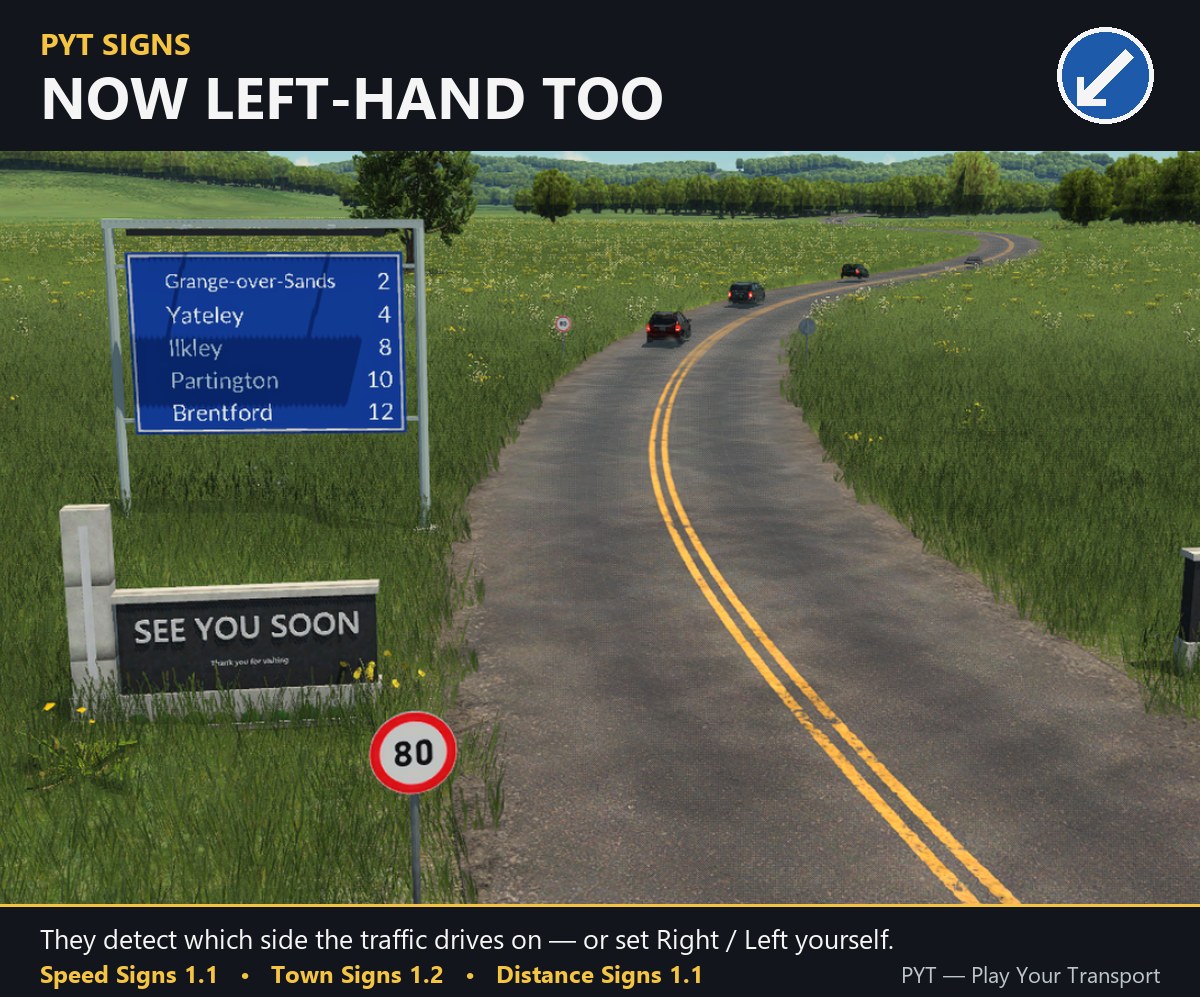
Not every sign in the picture comes with this mod — they are three separate PYT mods: PYT - Speed Signs · PYT - Distance Signs (this mod) · PYT - Town Signs — or get all three at once: PYT - Complete Road Signs Collection
OK, the left-hand drivers win — even if I am one, being in Australia. Every sign now knows which side of the road you drive on.
- Left-hand traffic — with the Left Hand Traffic mod, a signpost snapped to a road stands on the left-hand kerb, facing the drivers who read it
- New setting: Traffic drives on — Auto / Right / Left. Auto follows your game (left with the Left Hand Traffic mod); Right or Left if you ever need to set it yourself — on a placed sign too
- In plain terms: signposts stand on the correct side on left-hand maps; right-hand maps don't change
★ Thank you, NovaOfZion and jimbo_1977! You asked for left-hand driving — here it is.
1.0.2THE TOWN NEXT DOOR
Our signs were so polite they never mentioned the town right in front of them, in case it was the one they lived in. They have been told that's not how directions work.
- In plain terms: a sign on a country road close to a town now lists that town (it could stay on “Reading the roads” for ever); only a sign on the town's own streets leaves its town out
- A sign with really no town ahead says “No town ahead” instead of looking stuck
- Thanks to ajax_post on mod.io for the report