
PYT PC Early Access
Four PYT updates are waiting in mod.io’s approval queue — some for over a week. PC players don’t have to wait: install them by hand here. As soon as mod.io approves one, switch back to the normal subscription.
Why trust these files
- Newer than mod.io’s queue. Each is the version waiting for mod.io’s approval plus the crash fixes we found since — the same files we’ll upload to mod.io as soon as the queue clears.
- Scanned before they went up: Microsoft Defender, no threats found. Where a file has its VirusTotal report, it’s linked — checked by about 70 antivirus engines.
- Check your download: each file’s SHA-256 is listed below. In Windows PowerShell:
Get-FileHash .\file.zip— the two must match. - PC only. Consoles can’t install mods by hand; they get these the moment mod.io approves them.
The downloads
PYT - A Plus (Advanced Auto Naming)1.0.3
The whole mod — it isn’t live on mod.io at all yet. The game’s Auto-Rename button, plus a whole lot more: design your own line names by clicking pieces, let new lines name themselves in your style, number every vehicle after its line. Nothing changes until you say so. Plus the Mod Bar fix (see Blueprint Exchange).
Download A+ 1.0.3 SHA-256 98FEA2CC8489D4A9999056347AABBEFFBA23669E45AA212F98EFD71E9BF4648APYT - Blueprint Exchange1.3.2
Everything from 1.3, which never cleared the queue — players on mod.io still have 1.2.2: an honest paste preview (amber = it fits, red only when something is really in the way), Undo takes back just the paste, signalled track included, Move keeps an industry’s stock, one-step Delete, the keys work straight after Copy. Plus two crash fixes (thanks PHENlCUS): with Mod Bar, opening Blueprint Exchange from the PYT bar could freeze and close the game; with Better Switches, Select / Cut / Paste could close it.
Download Blueprint Exchange 1.3.2 SHA-256 6C4467A70880B01245978C723A508D55061DB68483D519C42A353566682D8716PYT - Pay Your Tolls3.0.2
Plays nice with Mod Bar: with Mod Bar installed, a click in the PYT bar could freeze the game and close it — fixed. The PYT button can also fade until your mouse is over it (PYT - Settings). Plus the PlayStation fix waiting on mod.io. Otherwise it plays like the live 3.0.
Download Pay Your Tolls 3.0.2 SHA-256 F93D23A04671CE04355026A5786D812459E451E9DF6296E0991A5156ECF3E31EPYT - Drone 20201.1.4
Plays nice with Mod Bar: the same fix for Drones’ PYT row, and the fade. Plus the PlayStation fix waiting on mod.io. Otherwise it plays like the live 1.1.2.
Download Drone 1.1.4 SHA-256 5DBAF53BA5EB56BDFD33B4C07508DD58F3A3B066CFFEBA33C020A72223C960CDCheck my download
Drop the zip you downloaded here (or pick it). Your browser works out its fingerprint on your own PC — nothing is uploaded — and tells you whether it’s byte for byte the file we scanned. Then see that file’s live virus scan by about 70 antivirus engines on VirusTotal.
How to install (PC)
- Close Transport Fever 3.
- Unsubscribe from that mod on mod.io (in the game’s mod browser or on mod.io) — otherwise the game finds two copies. Your blueprints, settings and saves are kept: they don’t live in the mod’s folder.
- Unzip it into your TF3 mods folder. The game opens it for you: in the main menu go to Settings > Advanced > Open User Data Folder, then open the mods folder there — leave that window open and close the game before you unzip. Each zip holds one folder (e.g.
epod_blueprint_exchange_tf3_1) — it goes straight into mods.
(By hand it’sC:\Program Files (x86)\Steam\userdata\<your Steam number>\3493540\local\mods\.)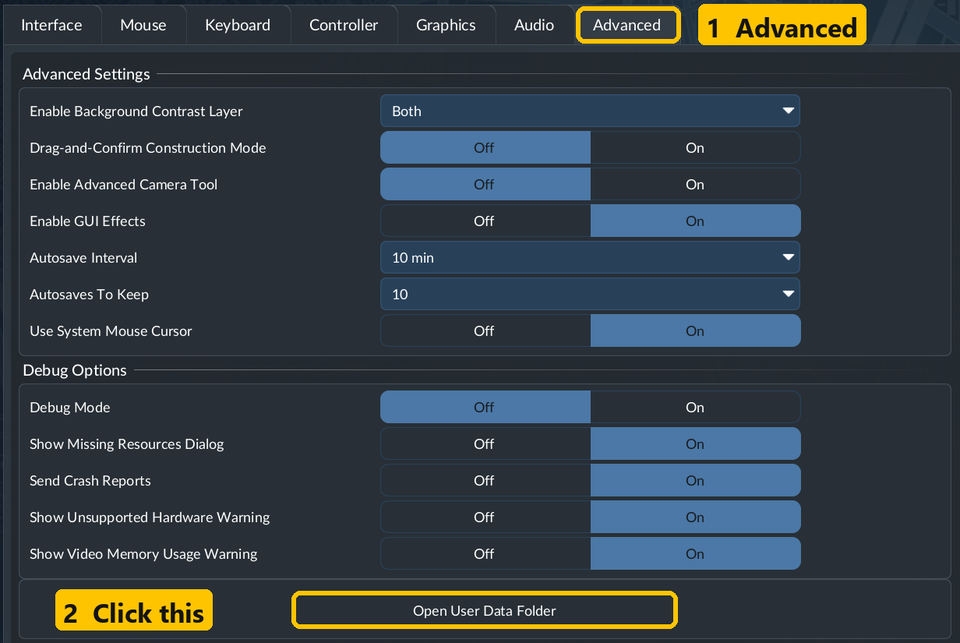
- Start the game. The mod is in the mod list under its usual name; switch it on for your save as always.
When mod.io approves it
Delete that folder from local\mods and subscribe on mod.io again — from then on updates arrive by themselves. Your saves carry on as before.
Something not working? Leave a comment on the mod’s mod.io page — we read them all.